Organise
Search your links
Search titles and addresses on your device, and use advanced fields to narrow results by note, list, or tag.
Search runs on the copy of your links held on this device. It works offline; our servers hold no readable copy of your link titles, addresses, tags, or notes to search.
Find a link
Open Search above your links and type a word from the title or address. Basic search is available on Free and searches all links you can currently open, rather than only the list you are viewing. A locked list is excluded until you unlock it.
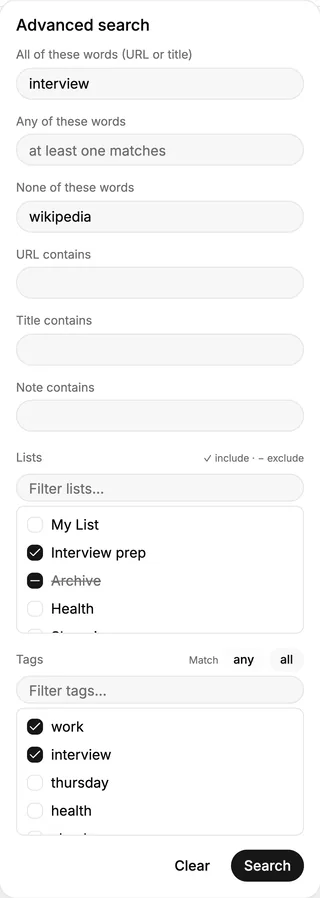
On Plus, open Advanced search to narrow the match. You can choose where words must appear, including a note, and include or exclude lists and tags. The tag controls can match any or all selected tags. Apply the search to see the results; clear it to return to the ordinary view.
The word fields have different jobs. “All of these words” requires each word in the URL or title; “Any of these words” accepts one; “None of these words” excludes matches. “URL contains”, “Title contains”, and “Note contains” target one field each. List and tag filters narrow the same result set. For tags, Match any accepts a link with one selected tag, while Match all requires every selected tag.
Search reflects the local copy. A link saved on another device appears here after it syncs. If a result is missing, check the sync status, your list locks, and the words in its title or address.