End-to-end encrypted · Local-first
The bookmark manager that can’t read your bookmarks.
What you save is a fairly complete picture of what you are reading, buying, worrying about, and working on. Bracemark encrypts every part of it on your device before it syncs — the address, the title, the tags, whatever you write about it — with a key your password unlocks. That key never reaches us. Not a promise we make — a thing we can’t undo.
Free for your first 200 links — start empty, or bring the library you already have. No card, and no email address. The two doors into your account are your password and a recovery code, and the app asks you to save both when you create the account — the password in your password manager, the code somewhere else.
On your device
How to Prepare for a Job Interview & Answer Common Questions
wikihow.com
What our servers store
last changed 2 minutes ago
k7QpV0sZ4mL8xR1cGf9tYb2NwJ3hD6aE5uT0iO8pA1sD4fG7hJ2kL5nM8qR3tV6xZ9yB2nM5kJ8hG1fD4sA7pO0iU3tE6rW9qY2xC5vB8nM1kL4jH7gF0dS3aP6oI9uY2tR5eW8qA1zX4cV7bN0mK3jH6gF9dS2aP5oI8uY1tR4eW7qZ0xC3vB6nM9kJ2hG5
A path, a size, a timestamp, and bytes we hold no key to open. Not the title, not the address, not the tags — there is nowhere for them to be.
What that shape still tells us: how many files you keep, how big each one is, and when they change. We would rather say it than have you work it out — and the privacy policy inventories every field we hold.
- No ads, ever
- The subscription is the whole business model, and a server that cannot read your library is cheap to run. No investor is waiting for us to change that.
- No trackers
- No analytics code, no fingerprinting. The only third-party script we load is our payment provider’s, on the one screen where you subscribe.
- No lock-in
- Full export on every plan, including the free one. The library is already on your device, so leaving is a copy you make rather than a request you file.
Getting links in
Four ways in, and none of them ask you to type the link.
A save you have to stop and think about is a save you skip. Whichever surface you use, the link is encrypted on the device before it syncs.
Browser extension
Chrome · FirefoxClick the icon on the tab you are already reading, then Save. The extension tries to take the title and preview image from your own browser, so no server of ours has to fetch the page.
Phone
iOS · AndroidShare into Bracemark from any app — a browser, a podcast player, a social app. It saves what that app hands over, sealed on the handset before it syncs. The app fills in the title and preview image itself the next time you open it.
The web app
Any browserPaste a URL and it is saved. Browsers won’t let a web page fetch another site, so the title and image need help: turn on server previews on Plus and pending links fill in as you browse, or let a phone set to All links fill them in after sync.
Import
One fileBring the library you already have: a browser bookmarks export, a Raindrop HTML export, or a plain list of URLs. Bringing more than 200 links? Take the first 200 now, or start the 14-day trial, which takes a card, and bring it all.
Finding them again
A private library is still a library.
Encryption is the part you don’t see. This is the part you use every day — and most of it is on the free plan.
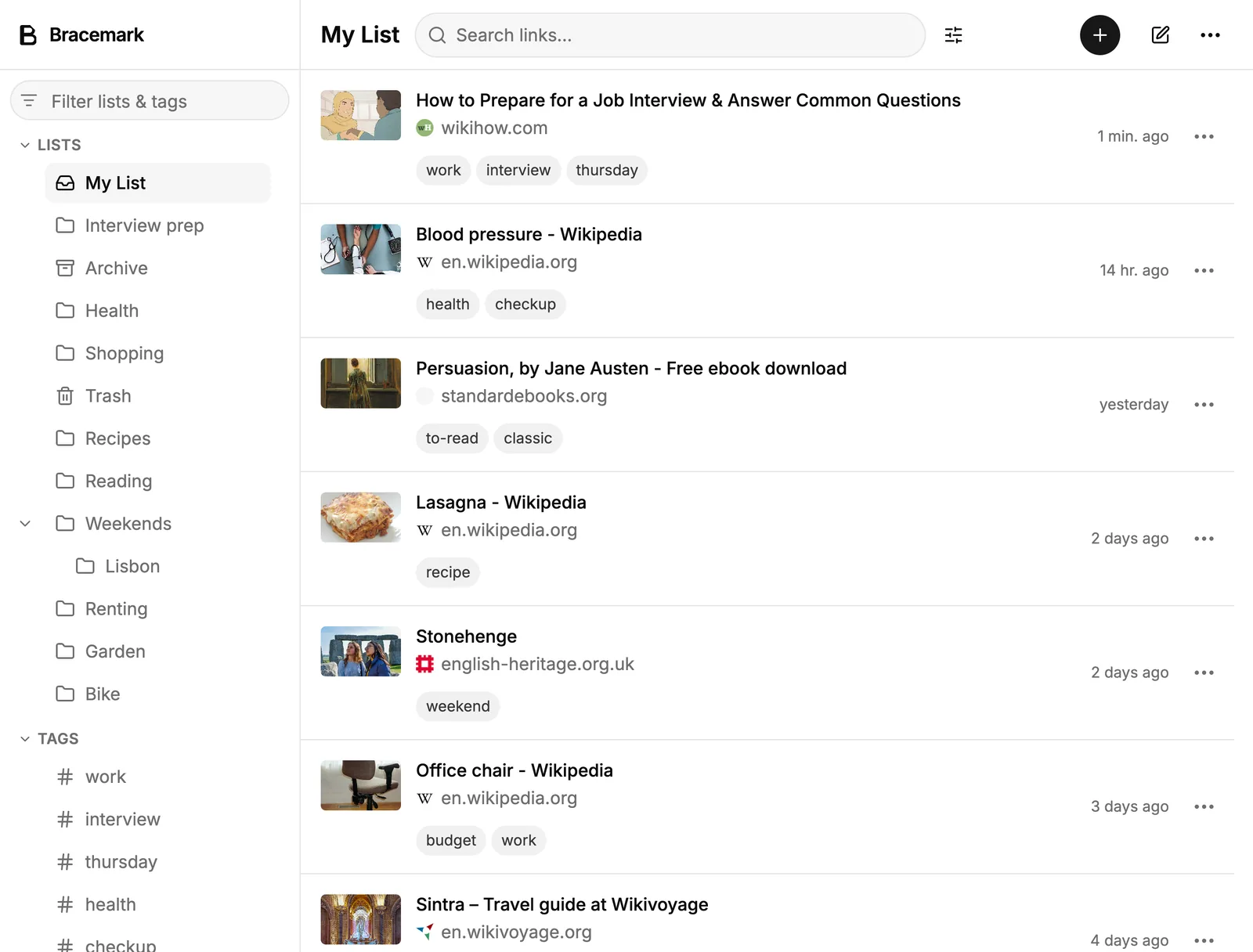
Lists, tags, and pins
Save a link to a list, tag it, and find it later. Pin a few of them to the top.
Notes
A line to yourself, whatever you want in it — encrypted, and searchable with Plus.
Card and list layouts
A wall of preview images, or a dense list. Choose one per device, if you like.
Search
Across titles, addresses, and hosts, every link. The Plus editor adds more fields.
Previews
Titles and images from the browser extension, the mobile app, or opt-in server previews on Plus.
Export
Several formats, one a complete backup that restores everything. Free on every plan.
Nested lists, hidden lists, the app lock, the structured search editor, and server previews are Plus. Everything else above is free.
Compared with
What we gave up to get here.
Hosted bookmark managers keep titles and addresses readable to run server-side features. Bracemark encrypts each link on your device before it syncs, so search stays on your device and server previews are a separate opt-in. Here is the trade, row by row.
- Search
A hosted manager
Runs on their servers, over your titles and addresses in readable form. That is what makes it possible.
Bracemark
Runs on your device, across titles, addresses, and hosts — every link, on every plan, and our servers hold no index of any of it. Searching by field, or across several lists and tags at once, is the Plus editor.
- Previews
A hosted manager
Their servers fetch every page you save, and keep what they find.
Bracemark
The browser extension tries to extract from the live tab when you save. The mobile app fetches on-device — saved links by default, or every pending link that comes into view when you choose All links. In the web app, opt-in server previews on Plus fill new saves and pending links as you browse; Generate all covers the rest.
- One link, two devices
A hosted manager
Their server holds the readable copy, so it can merge two edits, keep a version history, and give you back the one you wanted.
Bracemark
Each link is its own encrypted file, so edits to different links never collide. Edit the same link on two devices before they sync and the later edit is the one that survives — we hold nothing readable from your links to merge, and no earlier version to restore.
- Sharing a list
A hosted manager
Their server can read the list, so it can hand it to anyone you invite, or publish it at a link.
Bracemark
There are no shared or public lists. Sharing means handing someone the means to decrypt part of your library. It is real work rather than a button, and we would rather not fake it.
- A forgotten password
A hosted manager
They can mail you a reset, because they can read the library either way.
Bracemark
Your recovery code opens the account instead. The app offers you one when you create the account, and it is your other way in — like your password, a door only you hold. There is none we could open for you.
We don’t promise not to look.
We built it so we can’t.
- Your key
- Your encryption key is unlocked by your password on your device, with Argon2id. The key itself is random rather than derived from the password — which is how a recovery code can open the same library. Every link is encrypted with it before it syncs, and nothing but that key turns the result back into readable form. Neither the password nor the key is ever sent to us.
- Our blindness
- For each thing you save we hold a path, a size, a timestamp, and an encrypted blob — we cannot index your library, search it, or hand it to anyone in a readable form. What we can read is the account around it: your username, the public key your sign-ins are checked against, the sessions that keep your devices signed in, and your subscription if you buy one. The privacy policy inventories every field of it.
The honest cost of that guarantee: lose your password and your recovery code, and nobody — us included — can get the library back. So keep them apart: the password in your password manager, the code printed and filed somewhere else. How the account works.
If we disappear
The library outlives the company.
Every subscription should have to answer this, and ours can’t answer it with a promise about our future. Three properties of how it is built, ordered by how little each one needs from us.
- It is already on your device
- Bracemark is local-first: the copy you open, search, and edit is held on the machine in front of you, and syncing is how your other devices catch up. The library doesn’t need us to be reachable in order to open.
- Export is free, on every plan
- The complete backup is a zip: one JSON line per item, your preview images beside it as ordinary files, decrypted, readable in a text editor with nothing of ours installed. Formats other apps read are there too. Charging you to leave would undo the point of building it this way.
- The code is public
- Both apps, the browser extension, the server they sync to, and the one that fetches link previews are in a single GitHub repository under the AGPL-3.0. We don’t support self-hosting today, but the code doesn’t stop existing when a company does.
For whatever a track record is worth: Bracemark is the successor to Brace.to, a bookmark manager we have run since 2020 and still run today. Same team, same job — this one keeps the promise and rebuilds what it rests on. Where it came from.
Pricing
Free until your library outgrows free.
Start with 200 links and no card. Upgrade when you meet the cap — on day one if you are arriving with a library, later if you are starting fresh — with a 14-day trial that takes a card, and the same encryption, sync, and export on every plan.
Free
$0
200 links, no time limit
Plus
$48/year
Unlimited links, nested lists, app lock, search editor
Start empty, or bring the library you already have.
Pick a username, save the password we generate for you and the recovery code beside it, and save your first link a minute later.
Create your account